Features · Darts caller
Your own darts caller, like the referee on TV
Sridu has a darts caller built in. It calls the score of every visit, what you need for the finish, who throws next and the game shot, so you can keep your eyes on the board. It speaks classic English or your own language, and if you like, it speaks with your own voice.
- Calls in English, German and many more languages
- Recorded studio voices in English, German and Dutch
- Record your own caller voice
- Works offline
- T2060 points
- T2060 points
- T2060 points
- Treble 20 ×3A laser and a salute on every dart
- The 180 fanfareThe big word and confetti on the screen
- “One hundred and eighty!”The caller calls the visit
- Darts pulled, next playerA falling whistle, two short notes, Ben’s turn slides in
- “Ben, you require 40”A finish is on, so the caller says what is left
The caller
What the darts caller says, and when
The caller is on by default and follows the match without any input from you. You keep your eyes on the board and still know the score, what you have left and whose throw it is. Three switches in the caller settings control how much it says.
- The match startsGame on!
- Bull-offWhen a bull-off decides who startsBull up!Anna to throw firstTie. Throw again.
- Every dartThe first two darts by name, then the visitTreble 20BullseyeTwenty fiveMissCall every dart
- After every visitThe score of the three darts10045No score
- BustOver the score, or a finish the out rule does not allowBust
- A finish is on170 or less leftAnna, you require 40Call what’s left
- Next playerWith two players or moreBen to throwCall the players
- Leg and setGame shot, and the leg, Anna!Game shot, and the set, Anna!
- The matchIn the other modes: “Anna wins!”Game shot, and the match, Anna!
- A dart you correctAlways read backCorrected: Double 16
- A dart to checkAfter the scorePlease check dart 2Check throws
- The visit score, as on TV. After three darts you hear the score, or “No score”. Switch on Call every dart and it also names the first two darts as they land, then gives the total after the third.
- What you require. In X01, once a finish is on, the next player hears what is left: “Anna, you require 40”. Otherwise, with two or more players, you just hear “Ben to throw”.
- No backlog. Calls never queue up. A new score or result cuts off whatever is still being said, so you always hear what just happened. Only the request to check a dart waits until the score has been called.
- Corrections read back. Tap a dart to fix it and the caller reads out the new field, so everyone at the board knows what changed.
- At the other board too. In an online match, your opponent at their own board hears the same calls and sounds and sees the same callouts. If one of you uses a sound pack, each board plays its own.
- Sounds to go with it. Every dart also has its own sound, and a 180 or a bust appears in huge letters across the screen. All of that is on the sounds page.
Game modes
The right calls for every game mode
In Cricket or Tic-Tac-Toe a score of 60 tells you nothing. So the caller tells you what counts in the mode you play. In the target games it names your target when your turn starts, such as “Anna, Double 7” in Bob’s 27.
- Marks and hitsIn Cricket you hear the marks of a visit: “3 marks”. In Around the Clock, Bob’s 27, Killer and Last One Standing you hear the hits: “2 hits”.
- The next targetThe number of the round in Shanghai and the hole in Golf. Your number in Killer. In Around the Clock the next field after every hit, and in Rapid Fire the targets of the round, one after the other.
- Golf termsEvery hole gets its golf score: “Hole in one!”, “Birdie”, “Par”, “Bogey”, “Double bogey”.
- Special calls“Shanghai!” when you hit single, double and treble in one visit, “Ball to Ben” in Darts Football and “Ben, back to 301” in Elimination.
- The field, not the pointsIn Tic-Tac-Toe and Connect Four you hear the field that claimed the square or dropped the counter, such as “Treble 20”.
- The finish to go forIn Checkout King and 121 every turn starts with the checkout you need: “Anna, you require 81”.
Voices and languages
Classic English, or your language
By default the caller speaks the language of the app. The calling language is a separate setting, though, because plenty of players want classic English calls whatever language the app is in. Pick your calling language in Caller settings, then the voice to go with it.
- Kevindevice voice
- you requirerecorded
- 32recorded
- Game shot, and the match,recorded
- Lukasrecorded, a bot
Every fixed word, every number up to 180, every field, the names of the bots and “Player 1” onwards are recorded clips. Only a name you typed in yourself comes from the device voice.
- EnglishStudio voiceOne hundred and eighty! Anna, you require thirty two.
- DeutschDevice voiceEinhundertachtzig! Anna, du brauchst zweiunddreißig.
- NederlandsDevice voiceHonderdtachtig! Anna, je hebt tweeëndertig nodig.
- FrançaisDevice voiceCent quatre-vingts ! Anna, il te faut trente-deux.
- EspañolDevice voice¡Ciento ochenta! Anna, necesitas treinta y dos.
- ItalianoDevice voiceCentottanta! Anna, ti servono trentadue.
- Português (BR)Device voiceCento e oitenta! Anna, você precisa de trinta e dois.
- PolskiDevice voiceSto osiemdziesiąt! Anna, potrzebujesz trzydziestu dwóch.
- HrvatskiDevice voiceSto osamdeset! Anna, treba ti trideset dva.
- Studio voice (recommended)
- Browser voice (automatic)
- Daniel · en-GB
- Samantha · en-US
- Google UK English Male · en-GB (online only)
- The studio voicesEnglish, German and Dutch come with a recorded voice. Every call, every field and every number up to 180 is spoken by a natural-sounding neural voice. English also covers every number up to 901 and about 900 first names. In these three languages the studio voice is the default. In German, the English darts terms keep their English pronunciation, so “Game shot” stays “Game shot”.
- Loaded once, kept on your deviceWith the caller on, the app downloads the voice straight away (a few megabytes), then the bigger numbers. Names are fetched one at a time, and only for the players in your game. Everything is stored separately, survives app updates and works offline from then on. The first calls wait a moment for the voice instead of switching to another one. If it cannot load at all, the device voice takes over and the settings tell you so.
- One voice, one languageA call never switches voice or language halfway through. The studio voice calls the names it knows: the bots and “Player 1” onwards in the calling language, plus about 900 common first names in English. That includes “Thomas M.”, as long as no other Thomas is playing. A name it does not know is left out: “You require 40”. If you would rather hear it, set Other names to Device voice, and your device voice says just the name.
- The voices of your deviceThe other languages use the speech voices of your system and browser. Sridu picks the best one automatically, preferring voices that work offline and then those that sound most like a caller. Voices that need the internet are marked “online only” in the list.
- Your pickKeep the studio voice, let the app choose the best Browser voice, or pick any voice installed on your device. You can set the volume, and the speed for device voices. Hear a sample plays a call straight away.
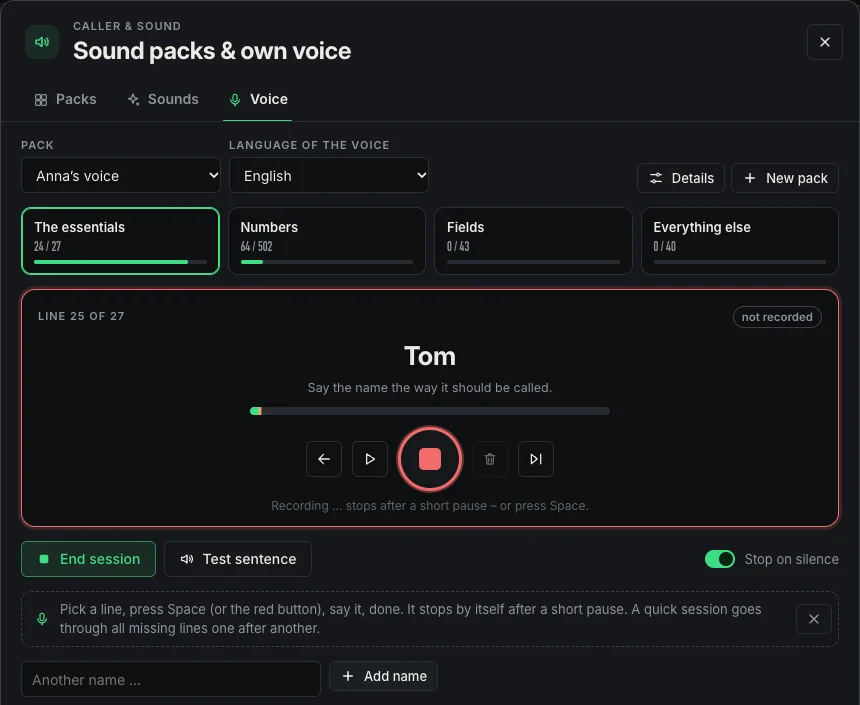
Your own voice
Record your own darts caller
Your voice, or a friend’s, can do the calling. It also says names the studio voice does not know, yours included. Start with Record your own voice in the caller settings or the Voice tab of the studio.
- Pick the languageCreate a pack and set the Language of the voice. The caller only uses lines that match the language it calls in.
- Group by groupThe lines are sorted into The essentials, Numbers, Fields and Everything else, each with its own progress bar. The essentials cover Game on, No score, Bust, the big scores, game shot and match, what a player requires, and the names of the players on this device. For a call with a name or a number in it you only say the fixed part.
- Quick sessionPress Quick session and say the line on screen. Recording stops after a short pause and the next missing line comes up. With a keyboard, Space starts a take (or hold it while you talk) and Enter moves on.
- Clean takesSilence is trimmed and the volume levelled for you. Play a take back, record it again, or press Test sentence to hear a whole call in your voice.
- Gaps filledYou do not have to record everything. Under Lines not recorded in the caller settings you choose whether The studio voice fills in or the caller leaves those lines out.
Close calls
An alarm when a dart needs checking
Sometimes the cameras are not sure about a dart, because it sits right on a wire or is hard to see. That should not get lost in small print, so you hear it and see it, and the score still comes first.
- T2060 points
- 5close to the wire
- T2060 points
- Treble 20, Single, Treble 20The sound of each field as it lands
- “125”You hear the score first
- The check alarmTwo notes, twice, that belong to no field
- “Please check dart 2”The caller asks for a look
- “Corrected: 20”If you tap the chip and then the right field
- The score firstThe dart counts as measured. You hear its usual sound, and the caller calls the visit.
- Then the alarmTwo notes, played twice. They belong to no field and to none of the celebration sounds, so you cannot mistake the alarm for a hit.
- Then the requestThe caller says “Please check dart 2”, and the “Check dart” callout shows the dart and the reason: close to the wire, or an uncertain reading. It comes once per visit, and after a 180 or bust call, never on top of it.
- Fix it, or leave itTap the orange chip, then the correct field, and the caller reads it back. If the dart was right, just keep throwing. Switch Check throws off and every measured dart counts without an alarm.
FAQ
Good to know
Does the caller need the internet?
No. Once loaded, the studio voice stays on your device, so does your own recorded voice, and most device voices work offline. The few that do not are marked “online only” in the voice list. The sounds are made by your browser, so they need no internet either.
Why do I hear nothing at first?
Browsers only play sound once you have tapped the page or pressed a key. Your first tap in the app turns the sound on, and from then on the caller and sounds play automatically.
Why does the caller not say my name?
Every studio voice has the bot names and “Player 1” onwards recorded, and the English one also has about 900 common first names. Any other name is left out so the call stays in one voice: “You require 40” instead of “Anna, you require 40”. To hear your name anyway, set Other names in the caller settings to Device voice. Your device voice then says just the name. Or record it yourself as part of your own voice.
Can I have English calls while the app is in my language?
Yes. Set Calling language to English in the caller settings. The app stays in your language, while the caller sounds like the one on TV: “One hundred and eighty!”
The voice for my language does not sound good. What can I do?
Try the other voices in the list. Sridu shows every voice your device has for the calling language, including any you add in your system’s speech settings. Or switch the calling language to English, German or Dutch to get a studio voice.
Can I record my own caller?
Yes. Tap Record your own voice in the caller settings and work through the lines in a quick session. Lines you have not recorded are said by the studio voice, or left out if you prefer. The details are under your own voice.
Can I turn off single calls?
Yes, three of them: every dart, what you require and the next player. The visit score, bust and game shot are always called while the caller is on. For silence, switch the caller off in the game menu.
Throw a 180 and hear the darts caller
Open the app, start a game of X01 and throw, or tap three treble 20s on the board. The darts caller and the sounds are on by default. How to play explains every setting.