Features · Sounds
A sound for every dart
Every dart in Sridu has a sound of its own, so you can tell a treble from a single without looking up. Your browser makes the sounds on the spot, so there is nothing to download, and a 180 or a bust also appears in huge letters across the screen. Any sound can be swapped for a file or a recording of yours, and your sounds go into packs you can pass on.
- Two built-in sets, Machine and Subtle
- Made in your browser, works offline
- Your own sounds from a file or the microphone
- Sound packs to export, import and share
- T1957 points
- T1854 points
- Bull50 points
- Treble 19a power-up sweep
- Treble 18a trill
- Bullseyea siren
- Ton forty plus 161a rising run
- Darts pulleda falling whistle
Sound design
Two sets, made right in your browser
The built-in sounds need no audio files at all. Your browser generates each sound from tones and noise at the moment it is needed, so there is nothing to download and it works offline. There are two sets: Machine sounds like the electronic dart machine in the pub, Subtle is quieter and softer.
Subtle: no signature sounds. Trebles, doubles and the 25 share one chime, and everything else is softer.
- Triple 20a laser, then a saluteFile …
- Triple 19a power-up sweepFile …
- Triple 18a trillFile …
- Treble (all the others)beep beepFile …
- Doubletwo rising notesFile …
- Singlea thud and a short blipFile …
- Bullseyea sirenFile …
- 25 (single bull)a boingFile …
- Misseda low buzzFile …
- 100+a rising runFile …
- 180the fanfareFile …
- Bustfalling notesFile …
- Leg wona short jingleFile …
- Game wonthe long jingleFile …
- Player changetwo short notesFile …
- Darts pulleda falling whistleFile …
- Board clearthrow againFile …
- Throw uncertain, check itthe alarmFile …
- Hear what you hit. In the Machine set every treble beeps, and treble 20, 19 and 18 have their own sounds: a laser followed by a salute, a power-up sweep and a trill. The bullseye sets off a siren and the 25 goes boing. You know what you hit before you look up.
- Your own sounds. Any of these can be swapped for a file or a recording of your own, so your board at home can sound just like the machine at your local. How that works is under your own sounds. Sounds you had replaced in an older version are now in a pack called “My sounds”.
- Off with one tap. The caller and the sounds each have their own switch in the game menu, so you can go quiet during a late match without leaving the game.
Your own sounds
Swap any sound for one of your own
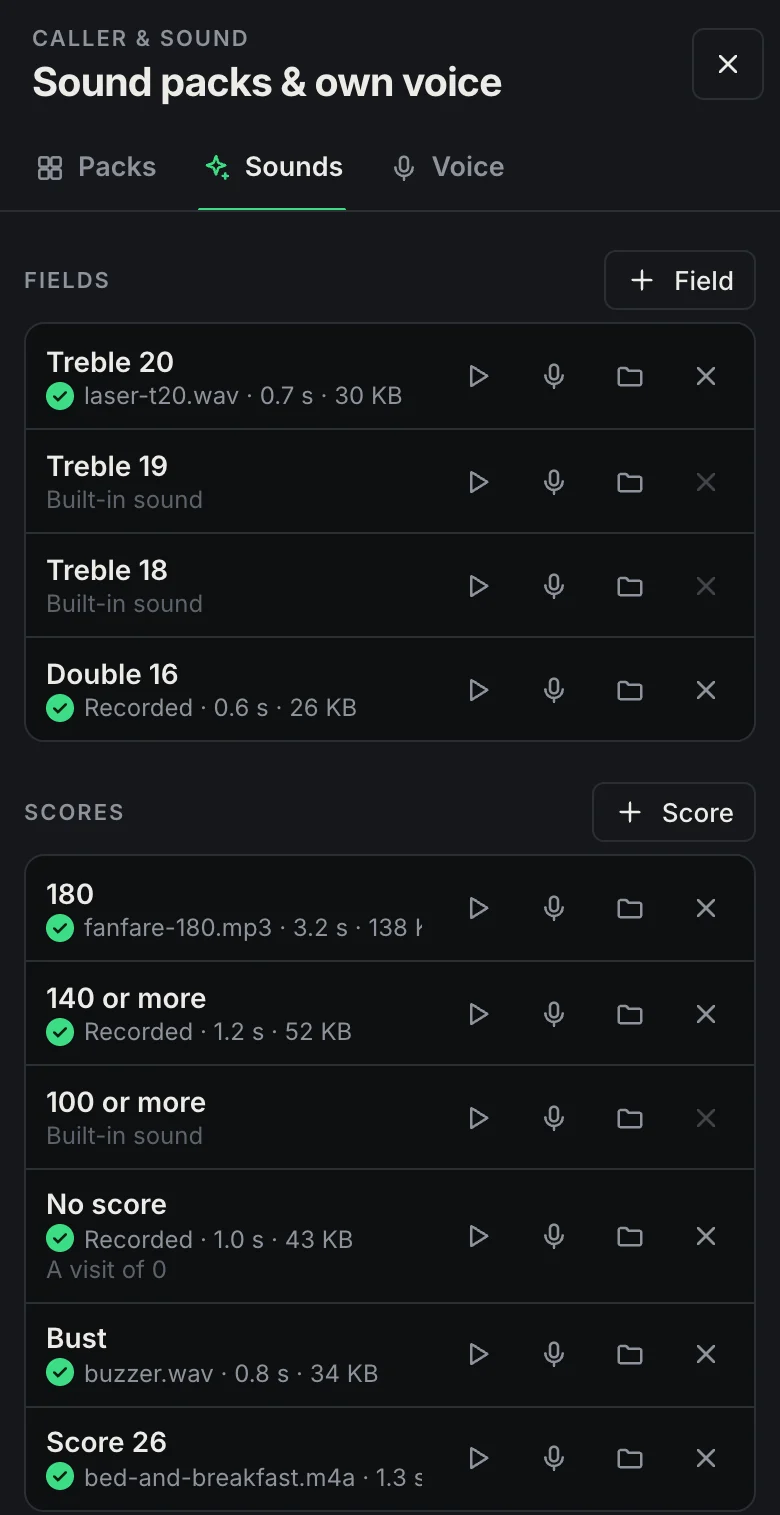
In Settings, tap Customise next to Sounds, or open Sound packs & own voice under Caller & sound. On the Sounds tab you can listen to every sound, record a new one with your microphone or pick an audio file. Anything you leave alone keeps the built-in sound.
- DartsMiss, Single, Double, Treble, Bullseye and the 25.
- FieldsTreble 20, 19 and 18 are there already. Field adds any other one, such as Treble 17 or Double 16.
- Scores180, 140 or more, 100 or more, No score and Bust. Score adds an exact score, so a 26 can get a sound of its own.
- GameThe checkout and a checkout of 100+, a leg, set or match won, a match lost, the nine-darter, the bull-off won, the next player, darts pulled, a break and a few more.
- File or microphone. MP3, WAV, OGG, M4A or WebM, up to 12 seconds. On a computer you can also drop a file onto the sound it should replace. Silence at the start and end is cut off and the volume is levelled, so a quiet recording does not get lost.
- The closest match plays. A treble 20 plays your Treble 20 sound if you have one, then your Treble sound, then the built-in one. A visit of 26 plays your 26 before anything else.
Sound packs
Packs to switch, keep and pass on
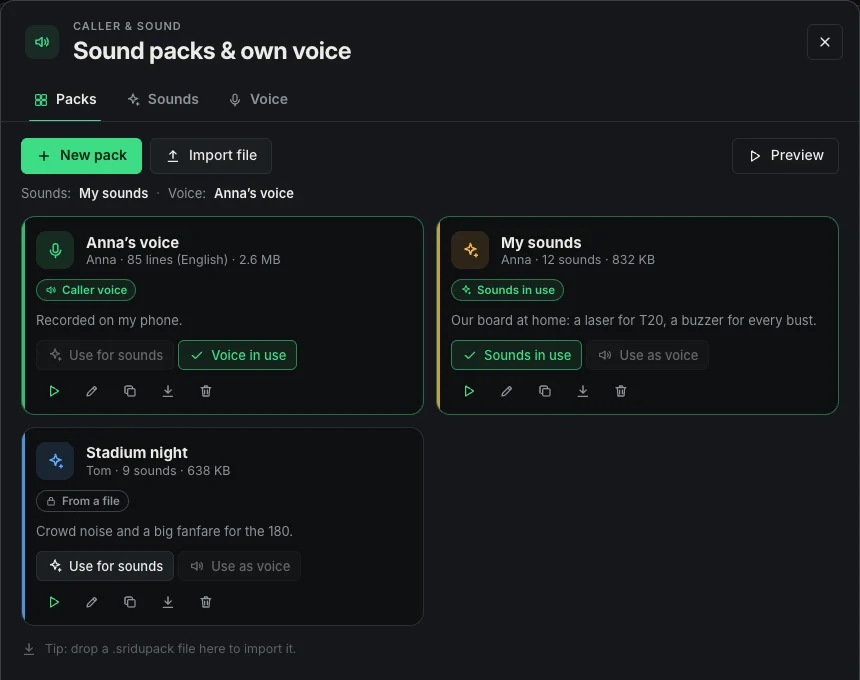
Everything you record or pick goes into a pack. A pack can hold sounds, a caller voice or both, and you choose which pack plays the sounds and which one does the calling.
- Switch in one tap. Every pack has Use for sounds and Use as voice. Preview plays a short sample of what is in use.
- As a file. Export as file saves a pack as a .sridupack file, on a phone through the share sheet. Import file brings it onto another device. Installed packs are read-only, and Edit a copy gives you a version to change.
- Stays on your device. Packs are kept in the browser on this device and never uploaded. Online matches send no audio either: each board plays its own pack.
- A library on your own server. If you host Sridu yourself, a Library tab lets everyone on your server share packs, listen in and install them. You decide on the admin page who may share. play.sridu.com has no library and keeps no packs.
On the screen
Big moments in big letters
A 180, a bust or a game shot gets a word right across the screen, big enough to read from the oche. Each comes with a sound, and the good ones with confetti.
- 180Maximum!
Confetti cannons from both corners
- 140Ton forty plus
A burst of confetti from the visit
- BUSToverthrown
The turn panel shakes
- GAME SHOTAnna
Confetti from the score
- LEGAnna
Or SET, when it ends a set
- SHANGHAI+120
Single, double and treble of the round
- 7 MARKS
Cricket: seven marks or more in a visit
- SENT BACKBen → 301
Elimination: you landed on his score
- CHECKDart 2 · close to the wire
Once a visit, after the score
- Calm motionScores count down to their new value, the field you hit flashes on the board, and the next player slides in like the flap of a departure board.
- Motion is optionalThe Animations switch turns all of it off, and it stays off automatically when your system is set to reduce motion. You miss nothing, because the score, messages and panels always show everything in plain view.
- Portrait layoutMount a screen upright next to the board and Sridu adapts the layout automatically: everything in one column, a huge remaining score, bigger chips and scores. No setting needed.
- Camera scanIf you play with cameras, a switch shows how they find each dart, with beams from every camera meeting on the board. More on the camera scoring page.
- On your streamWith streamer mode, what the caller says can run as subtitles over your stream, and the big moments show up in the overlay too.
FAQ
Good to know
Do the sounds need the internet?
No. Your browser makes the built-in sounds while you play, and your own sounds and packs are stored on your device. Nothing has to load, so it all works offline.
Why do I hear nothing at first?
Browsers only play sound once you have tapped the page or pressed a key. Your first tap in the app turns the sound on, and from then on the caller and sounds play automatically.
Which audio files can I use?
MP3, WAV, OGG, M4A or WebM, up to 12 seconds each. You can also record a sound with your microphone right in the app. Silence at the start and end is trimmed and the volume levelled for you.
Where do my recordings end up, and can I share a pack?
They stay on your device, in the browser’s storage. Sridu never uploads them, and in an online match your opponent hears their own sounds, not yours. To pass a pack on, export it as a file and import it on the other device. On a server you host yourself there can also be a library for everyone on that server, but a pack only goes there when you share it. Clearing the site data in your browser deletes your packs as well, so export the ones you want to keep.
Can I turn the sounds off and keep the caller?
Yes. The sounds and the caller each have their own switch in the game menu, so you can keep the calls without the beeps, or the other way round.
Hit a treble 20 and hear it
Open the app, start a game of X01 and throw, or tap a treble 20 on the board. The sounds are on by default, and the darts caller calls the visit. How to play explains every setting.