Hardware · Better detection
Better dart detection
Darts missed, or scored in the wrong field? The cause is nearly always the light, a camera that has moved or a webcam that keeps adjusting its picture. This page helps you find it and fix it, usually in a few minutes.
In short
- Light the board evenly. A ring light around the board works best, one lamp from the side works worst.
- Three cameras, spread evenly around the board and mounted firmly.
- Lock the picture once the board light is on, so the webcams stop readjusting.
- Measure instead of guessing. The camera check and a test throw show in millimetres how well your setup works.
Light
Even light, no hard shadows
The cameras notice a new dart as a small change in the picture. Hard shadows and light that keeps changing cause more trouble than any webcam.
That is why we recommend a ring light: an LED ring that sits around the board and lights it from every side at once.
Good light
- A ring light (LED ring) around the board
- Light from the front, not from behind the oche
- The same light all evening, with the curtains closed if the sun reaches the board
- Flicker-free LEDs
Trouble
- One spotlight or lamp from the side
- A ceiling lamp behind you, so your shadow falls on the board as you step up
- Old fluorescent tubes or cheap bulbs that flicker on camera
- Daylight that comes and goes with the clouds
Small shadows are fine. Sridu expects them: evenly darkened areas barely count when it measures a dart, and a camera line that misses the others by more than 12 mm is dropped. Long, hard shadows from a side lamp are what still gets through.
Cameras
Where the cameras go
One camera works, but it has to guess where a hidden tip is. Each extra camera sees the board from another side, so darts that hide each other are still read. We recommend three.
How to build the mounts yourself is in the DIY camera dartboard guide. Which webcams to buy and how to mount them is on the hardware page.
- Spread them outWith three cameras, one every 120°, with four, one every 90°. Two cameras close together see almost the same thing.
- 30 to 50 cm awayClose enough for detail, far enough away that each camera sees the whole double ring.
- From the sideEach camera looks in at an angle, so it sees the dart from the side and can measure its line.
- Mounted firmlyA camera that shakes when a dart lands costs accuracy. Sridu notices when one has moved, but a firm mount saves the trouble.
- One USB port eachSeveral cameras on one port or hub can leave one without a picture. Spread them over the ports of your computer.
- 720p is enough1280 × 720 is the default under Camera resolution. 1080p is a little better if your computer keeps up, see the system requirements.
Picture
Lock exposure, focus and white balance
A webcam readjusts its picture whenever something changes, for example when you walk up to the board. To the detection that looks like a change on the board.
Locking the picture stops it. It takes a minute per camera and is saved for each one.
- Switch on your board lightThe light you actually play with, ring light included.
- Open Cameras, then ImageFor one camera at a time. At the top it says Adjusting automatically.
- Let it focus, then tap LockThe camera adjusts once more and keeps those values. It now says Picture locked.
- Light changed? Tap Re-measureThat locks the picture again for the new light. Auto hands control back to the camera.
Chrome and Edge let Sridu lock the picture. If a camera or browser doesn’t allow it, the panel says so. Then keep the light as steady as you can.
Check your setup
How good is it? Measure it
Two tools on the Cameras page tell you in millimetres how well your setup works. Neither of them scores anything, so you can use them any time.
Check: how each camera fits the board
Check shows every camera picture straightened out, with the app’s lines on top. Next to each camera you see how closely the lines fit the board, as ±mm. Up to 0.9 mm counts as good. Above that, or when too little of the rings was found, it says imprecise. Then look at the light and the view of that camera, or tap Lines wrong and drag the points yourself.
Test throw: how the cameras agree on a dart
Throw a few darts in Test throw. For each one you see the field, the spread in millimetres (how far apart the cameras’ readings are), how many cameras were used and how sure the reading is.
One line keeps missing? Each camera’s line has its own colour. If one of them often misses the point where the others cross, start with that camera: its mount, its view of the board and the light on its side.
- ≤ 0.9 mmcamera check: the lines fit the board well
- < 4 mmspread for a certain reading, with at least two cameras
- < 10 mmspread for fairly certain
- 30 dartswith the cameras before the accuracy figure shows up
Statistics
What your accuracy figures tell you
At the end of the Statistics tab in your profile, the folded box Camera accuracy · this board shows how many camera darts in your last 20 matches were detected correctly. It shows up after 30 camera darts. The four figures below it point to the cause when something is off.
- Corrected · wrong fieldThe cameras saw the dart but put it in the wrong field. Usually a camera has moved or its lines don’t sit on the wires. Re-measure, and check the 20 and the lines.
- Added by hand · not seenA dart the cameras missed. Often dark darts on dark fields in weak light, or a part of the board a camera doesn’t see. Better light helps first.
- Taken back · no dart thereThe cameras reported a dart that wasn’t there. Something changed in the picture: flickering light, a moving shadow or a webcam readjusting. Lock the picture and keep the light steady.
- Flagged unsureDarts close to a wire that you were asked to check. If only a few of them turned out wrong, all is well. If you get lots of them, a third camera or better light helps.
Automatic
What Sridu does by itself
A lot of small trouble never reaches you. Here is what the app handles on its own, and where to switch it off.
- Re-measures a moved cameraWhile the board is empty, each picture is compared with the last measurement. If a camera has moved, or you corrected several darts in a short time, the cameras are measured again before the next visit, and the 20 stays put. Re-measure cameras automatically in the settings switches it off.
- Looks again near a wireA dart close to a wire is measured three more times. Only if it still sits too close to the wire does it turn orange for you to check. How close is set under Check throws.
- Tells your hand from a dartA hand is big and slow, a dart small and fast. Pull your darts and the next visit starts. A dart pushed in by hand doesn’t count.
- Spots bounce-outsIf darts drop out of the board with no hand in the picture, that is a bounce-out. The visit goes on and those darts score 0.
- Follows slow light changesWhile nothing happens at the board, Sridu keeps its picture of the empty board up to date. For a sudden change, tap Re-measure in the game.
Check throws
How strict the check is
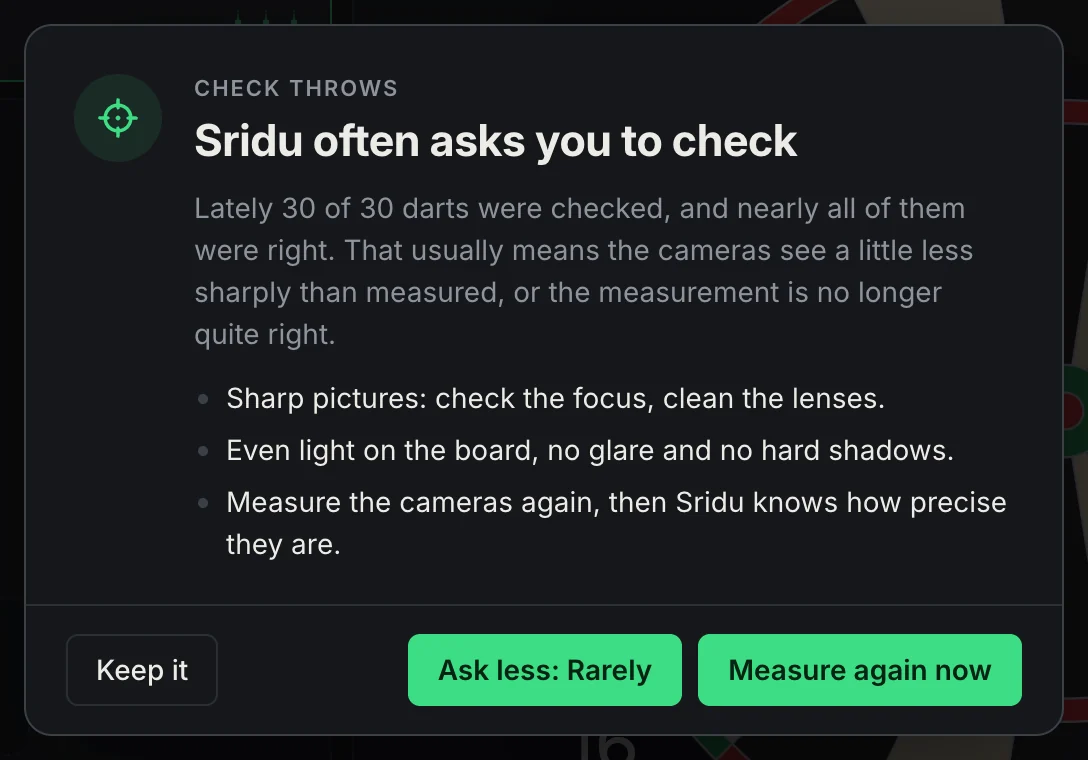
A dart turns orange when Sridu is not sure enough of its field. When the cameras name different fields for it, or only one camera sees it, that is always the case. Otherwise Sridu works out how likely the dart is in the next field: from the distance to the wire and from how precisely your board measures. A sharp, well measured board therefore asks less often. Under Settings, Check throws you choose from what chance it asks.
- OffEvery dart counts as measured, with no tone and no question. Fine if you watch the board anyway or play with one camera for now.
- RarelyAsks only from a 20 % chance of the next field. The fewest questions, for a board you hardly ever correct.
- NormalThe default. Asks from 8 %. On a good board that is about one 180 in five, and only about one dart in 500 slips through wrong.
- ThoroughAsks from 3 %. Good right after setting up, after moving a camera, or if darts keep landing in the next field.
Only check what counts
In games with target fields, such as Cricket, Around the Clock, Tic-Tac-Toe or Radar, Sridu only asks about a dart on a wire when it would change something. If it sits at least one whole field away from everything you need to hit, it scores nothing on either side of the wire: no orange, no tone, no call. In X01 every field counts, so there Sridu asks as usual. You can switch this off under Settings, Only check what counts.
Sridu learns your board
If you keep confirming checks without changing anything, Sridu slowly asks less often. If you have to correct darts on a wire that it did not ask about, it gets more careful.
When it stays too much or too little, Sridu says so between two visits and offers what helps: measuring the cameras again, or a level less or more. Keep it means two weeks of quiet.
Why does the measurement count too? Several looks at a dart standing still only show how much the picture flickers. If the calibration is off by a fraction of a millimetre or the picture is blurry, every look is wrong the same way. So Sridu adds the precision of the last calibration to the sum, and Re-measure cameras automatically catches a camera that has moved.
Troubleshooting
Common problems and fixes
Start with the problem you see most. One fix at a time, then throw a few test darts.
A dart isn’t detected at all
Check that every camera sees the whole double ring and that the light reaches that part of the board. Dark darts on dark fields in weak light are the classic case. If it keeps happening, lower Sensitivity a little under Test throw › Advanced. If the red difference image then flickers with no dart there, you went too far. Until it is sorted, tap the board to add the dart.
Darts land in the wrong field
Most often a camera has moved. Tap Re-measure in the game, the crosshair button next to Pause. If the 20 is in the wrong place, open Check on the Cameras page and tap 20 wrong. If the lines are slightly off, Lines wrong lets you drag the points, then tap Refine.
Darts hide each other
A dart can block another one’s tip from a camera. The more viewpoints, the better: with two cameras a tight group needs a correction now and then, with three spread evenly even tight groups are read reliably.
Bounce-outs and darts on the floor
A dart that knocks another one out is spotted as a bounce-out and scores 0. A dart that bounces off without sticking leaves nothing for the cameras to see, and by the rules it scores nothing. If you want it counted as a dart thrown, tap outside the double ring to enter a miss.
Darts appear that were never thrown
Something in the picture changed. Lock the picture, switch off lamps that flicker and keep daylight off the board. If it happens right after you step up, a lamp behind you is throwing your shadow onto the board.
Almost every dart turns orange
With one camera that is normal, because the tip can only be estimated. Add a second or third camera, or switch off Check throws for now. With several cameras, look at the light and run the camera check.
A camera shows no picture
Usually the USB port is overloaded or another program is using the camera. Plug the cameras into different ports, or set Camera resolution to 640 × 480, then try again.
Scores come late or the picture stutters
Every camera keeps the processor busy. Check the system requirements and the tips there for slower computers. A laptop on battery saver can be much slower than usual.
Still wrong?
Tell us about it
If none of this helps, send us a report straight from the app: from the ⋯ menu of a game or the last row of the settings. How to report a problem explains what is sent along.
- Your setupHow many cameras, where they hang and what light you have.
- Your figuresThe ±mm of the camera check and the spread of a few test throws.
- A screenshotOf the Cameras page, or of the dart that was scored wrong.
Back to the board
Good light, three cameras and a locked picture: that is most of it. Then throw a few test darts and play.