Features · Statistics
See your game, dart by dart
Sridu keeps darts statistics on every match and every dart it has recorded. You see where your darts land, how your average moves, how often you check out and how you did against your opponent. It all sits in your profile, kept per player and per game mode, on your own device, with no account.
- A card for every game mode you play
- The last 30 days, 90 days or all time
- Heatmap of every dart that has a position
- Export, or move a player to another device
Anna
ID K7QF-2M9X last played 2 hours agoOverview
Your profile at a glance
Your statistics live in your profile. Open Profile in the app, pick a player at the top and choose a period: the last 30 days, 90 days or all time. The first tab, Overview, sums it all up on one page.
- Four headline numbersGames played, your win rate and the key figure of your two most-played modes, such as the X01 average and the Cricket MPR. Each comes with a small trend and the change against the period before.
- Activity and recordsTwelve weeks of playing days as a grid, next to your records: best leg, highest checkout, best visit and the bests from your drills.
- Your game modesA card for every mode you have played, with its key figure, a trend and how often you won, and how many of all the modes you have tried so far. Tap a card to open that mode under Statistics.
- Mini games and trainingParty games and drills that are not rated show up as chips, with your wins or your record.
- Recent games and next badgesYour latest games across every mode, and with progress switched on, the badges you are closest to.
Per player and per mode
Darts statistics, one mode at a time
In 501 you aim at the treble 20, in Around the Clock at each number in turn, in Bob’s 27 at the doubles. An average or a heatmap across all of that would tell you nothing, so Sridu keeps the game modes apart. The Statistics tab of the profile shows one mode at a time: pick a mode, and everything below is about that player in that mode.
Each mode has one headline figure. It sits in large type at the top, and the trend next to it shows it match by match.
- AverageThe 3-dart average in X01 and Elimination. It is worked out over all darts in the range, so a long match counts for more than a short one.
- MPRMarks per round in Cricket, counted per three darts.
- Hit rateIn Around the Clock, the share of your darts that hit the number you were on.
- Points per dartIn Blackout, shown to two decimal places.
- Points or killsPoints per match in Around the World, Shanghai, High Score, Halve-It, Rapid Fire, Bob’s 27 and Radar. Kills per match in Killer.
- 30 days, 90 days or all time. One switch at the top of the profile sets the period for everything, from the headline figure to the heatmap.
- Better or worse than usual? A small tag compares the figure with the period before, such as +2.6 vs. previous 30 days. Over all time it sets your last 30 days against everything. It turns green when you are up.
- The trend. One dot per match, filled in for the ones you won. A dashed line marks the average of the range, and the latest value is written next to it.
- Head to head and ranking. The comparison puts you next to another player of this board in the same mode, figure by figure, with your direct duels. Folded below it is the ranking of everyone here, best first. Your recent games list each match with its value.
- Badges and challenges. They have their own tabs in the profile, Badges and Challenges. With progress switched on, your player level sits at the top. Level & badges explains how they count.
- How well the cameras see. Folded away at the end of the Statistics tab is a part about your board, whoever threw. It shows the share of camera darts nobody had to change over the last 20 matches, with a trend. Below that are the darts that were corrected, taken back because nothing was there, added by hand because the cameras missed them, and flagged as unsure. The figure appears once 30 camera darts have been counted.
Hit pattern
Where your darts really land
Every dart with a position goes onto the board. That means each dart the cameras measured, and each tap on the board when you score by hand. If you keep landing low under the treble 20, or drift towards the 5 or the 1, you will see it straight away.
Hit pattern
Hits per number
Rings
The same player, more and more darts
- HeatmapThe darts are placed on a grid of about one millimetre and then smoothed. The colour scale is close to linear, so a bed you hit ten times as often looks ten times as hot. Nothing gets exaggerated.
- Sharper with more dartsWith a few dozen darts you get soft clouds, smoothed over about 8 mm. At a thousand darts it drops to about 4 mm, at ten thousand to about 2 mm, and single beds stand out.
- Every dart as a dotSwitch to Hits and each dart becomes a dot with a dark rim. Even a tight cluster in the treble 20 still shows as single darts. The app remembers which view you prefer.
- Wheel and ringsThe wheel shows your hits per number in board order, with your three most-hit beds below it. The rings bar splits your darts into trebles, doubles, singles, bull and misses.
Rates and counts
The numbers that matter in each mode
Below the headline come the numbers that suit the mode. X01 gets the full set, grouped into scoring, finish and result, and Where the darts go follows with the heatmap. Cricket adds your marks, Around the Clock your hits, Killer your kills and Radar your best streak. Bob’s 27 shows your double rate and your weakest game. Every mode shows your best game, your win rate and how many darts you threw.
Scoring
Finish
Result
- Checkout rate. Any dart you throw when one dart could win the leg under your out rule is an attempt. Every finish is a hit, so 41 of 121 means 41 checkouts from 121 darts at a finish.
- Double rate. Your darts at doubles. That covers checkout darts in X01 with double out, Bob’s 27, and Around the Clock played on the doubles.
- First 9. The average of your first three visits in each leg, while you are still scoring freely.
- Best leg, best visit, highest checkout. The fewest darts in a leg you won, your highest visit and your highest finish.
- 100+, 140+ and 180. Counted in bands. 100+ means visits from 100 to 139, 140+ means 140 to 179, and a 180 only counts as a 180.
- A bust scores nothing. Its darts still count, so a bust drags your average down, the same as in any league match.
During the match
Live figures as you play
Below the scoreboard is Match statistics, a panel that opens with one tap. It has a column per player and fills up visit by visit. The player at the oche gets a highlighted column.
- The right figures for the mode. X01 shows average, first 9, checkouts, best visit, highest checkout, best leg, and your 180s, 140s and tons. Cricket shows MPR, marks and points. Bob’s 27 shows the double rate, Around the Clock the hit rate.
- Legs and sets appear at the top when a match runs over more than one.
- Open or closed. The app remembers how you left it. On a second screen, such as a phone next to the board, the panel opens by itself, because that is what the second screen is there for.
- On stream too. The overlay of the streamer mode can show average, first 9 and checkout rate under each name, and the last visits beside each score.
Match statistics
| Anna | Ben | |
|---|---|---|
| Legs | 1 | 1 |
| Average | 70.5 | 74.7 |
| First 9 | 84.0 | 87.3 |
| Checkout | 33 % (1/3) | 25 % (1/4) |
| Best visit | 140 | 180 |
| Highest checkout | 40 | 40 |
| Best leg | 18 darts | 21 darts |
| 180 · 140+ · 100+ | 0 · 1 · 3 | 1 · 1 · 2 |
| Darts | 51 | 51 |
Visits
Every visit, right beside the score
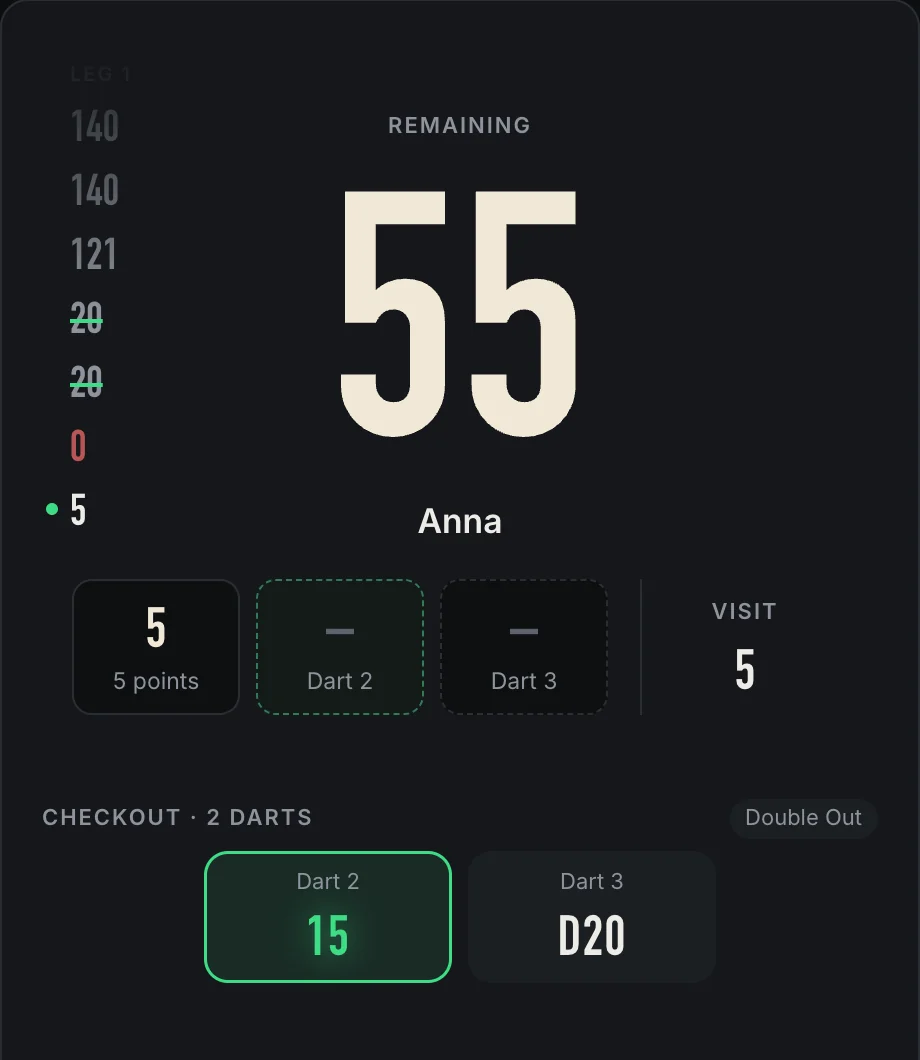
In X01 the visits of the player at the oche stand in a quiet column at the left of the score panel. It changes with the player, so you always see the history of whoever is throwing.
- One after the other. The visit running now sits at the bottom with a green dot and counts up dart by dart. When it is over it moves up, older ones fade out.
- Missed chances stand out. A visit struck through in green could have finished the leg. The checkout shows in green, a bust as a red 0.
- Every leg each start with a Leg mark, so the figures never stand there without context.
- Quiet by design. It only uses the free room beside the big number. If you don’t want it, switch off Visits beside the score in the settings.
After the match
Head to head, visit by visit
When a match ends, the win screen shows how it went. With two players you get a duel: the score in legs or sets, then each figure side by side. Bars grow out from the middle, and the better side is highlighted.
Anna wins
Visits
- When fewer is betterFor most figures, higher is better. Where lower wins, the duel highlights the lower side: best leg in darts, beds still lit in Blackout, darts needed. Decimals stay as the game shows them, such as points per dart in Blackout.
- Every visit a barIn X01, High Score and the scoring drills, each visit gets a bar, leg by leg. Higher scores are brighter, a 180 is cream, and a dashed line marks the average. You can see at once where a leg got away from you.
- A page per playerTap a name to see that player’s visits, heatmap and rings for this match. Tap the heatmap to switch to single darts. With three or more players, the figures appear as tiles instead of a duel.
- Your leaderboard placeAfter X01 and Cricket, one line tells you how the match moved you on this device’s leaderboard, such as Place 5 → place 3.
Share it
A match worth showing, as a picture
Tap Share on the result screen and Sridu builds a card of the match: the result, your average counting up, the key figures for the mode and where your darts landed, finished with a little sweep of light. Pick square for a chat or a post, or story for Instagram and WhatsApp.
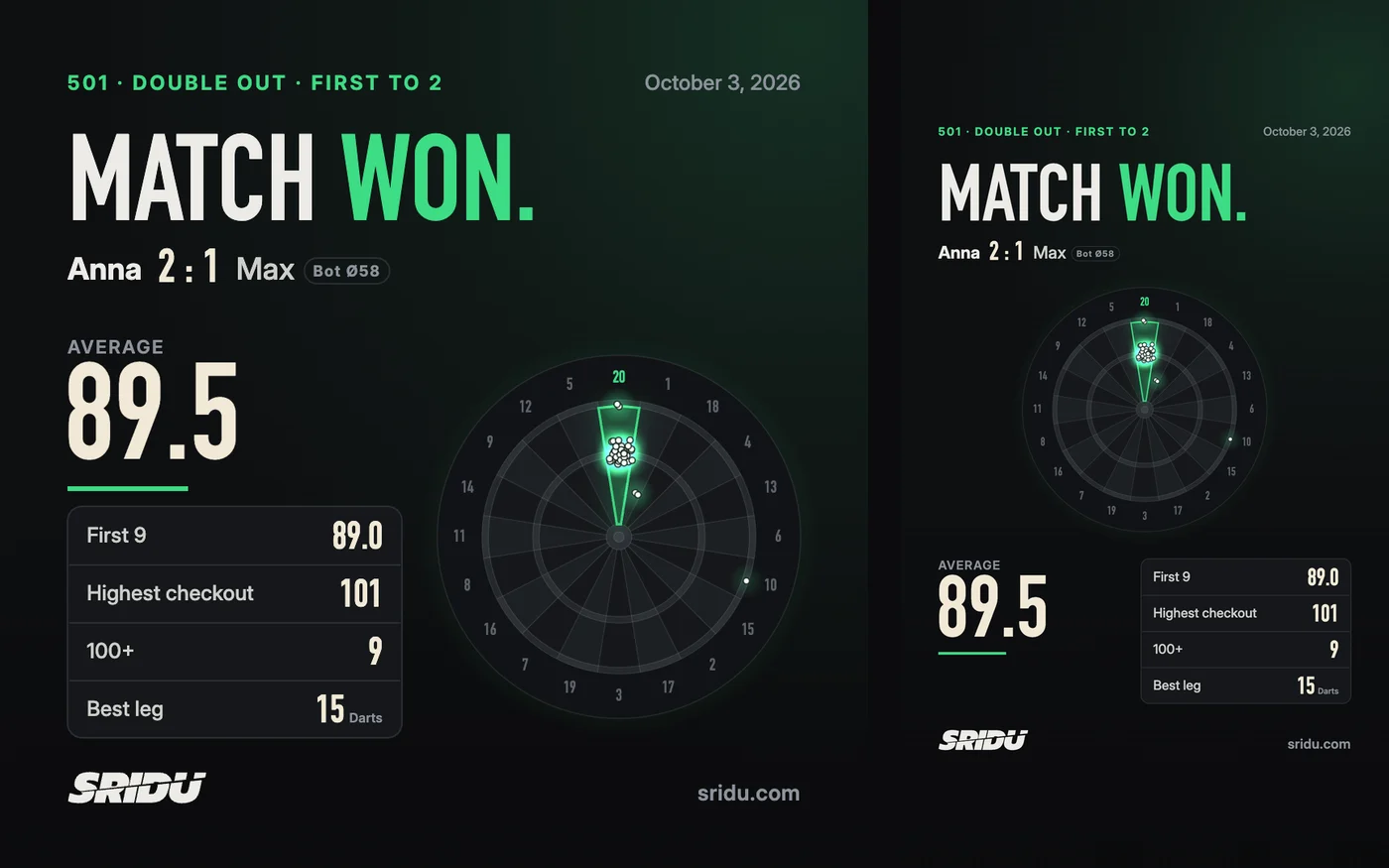
- After every matchWin, loss or draw, in every mode. Drills offer a card when you set a new record, and so does a challenge you win.
- Made on your deviceThe picture is drawn in your browser. Nothing is uploaded, and you can hide your opponents’ names before you share.
- Honest about botsA bot opponent is labelled as one, with its average, such as Bot Ø58.
- Share, save or copyOn a phone the share button opens the usual share sheet. On a computer you can save the image or copy it straight into a chat.
What counts
Your darts, and only yours
Statistics belong to a player, not to a device or a match. Each player gets a profile with a permanent ID, shown next to the name at the top of the profile. The ID goes with the player to any other device.
- Finished matches feed a mode’s figures: headline, trend, rates, games and wins.
- A match called off is not lost. Once the first dart is thrown, the match is saved. Its darts still count towards your badges and the profile others see in the lobby. It does not count as a game or a win, and stays out of the mode’s figures.
- Bots and teams stay out. Bots never get statistics. A team match says little about any one player, so it stays out of the members’ figures.
- Party games and drills are not rated. Tic-Tac-Toe, Darts Football and the other party games show their figures at the end, and so do drills such as Checkout King. Drills keep your personal records instead.
Yours to keep
New phone? Take your statistics with you
Your statistics are stored in your browser, not on our servers. To move a player to another device, open Profile on the old one, tap ⋯ Data and then Switch device. The player, their matches and their challenge progress go straight from one device to the other.
Anna31 games · ID K7QF-2M9X
- New device: scan the QR code, or tap “Receive” there and type the code
- Both devices show the same check number
- Tap “Allow” here
iPhone wants to take over Anna
- Show the codeThe old device shows a QR code and a 12-character code. Choose the player you want to send.
- Scan itScan the QR code with the new device’s camera and the app opens. Or tap Receive on the new device and type in the code.
- Compare the numberBoth screens show the same four digits. That way you know the device asking is the one in your hand.
- Tap AllowDo this on the old device. Only then is the player sent, encrypted and direct, with no server and no password involved.
- Why it is safeA code works once, for ten minutes. A photo of the QR code or a forwarded link is useless without the tap on the old device. Both devices keep the data, and moving again later only adds the new matches.
- Export and importBoth are in the Data menu too. Export saves everything in this browser to one JSON file: games, settings, players and calibrations. Import reads it back and either adds the games to the ones already there or replaces everything.
- CSV for your spreadsheetAll games as a table, one row per player and match, with date, match, winner, legs, sets, darts, points, average, first 9, checkouts, best visit, highest checkout, best leg, 180s, 140s and tons. In languages that write decimals as 3,50, semicolons separate the columns so Excel and Numbers open the file correctly.
- On your own serverIf you run Sridu on your own server, it stores matches, player IDs and challenge progress in its data folder for every browser that connects. Camera setup and sounds stay on each device.
FAQ
Good to know
Do I need cameras for the statistics?
No. Every figure works when you tap your darts in on the board. Each tap has a position, so the heatmap fills up too. With cameras you just throw, and each dart is placed exactly where it landed. Only the camera accuracy at the bottom needs them.
Do I need an account?
No. Players, matches and figures are stored in your browser. Nothing leaves it unless you play online, move a player, join the online leaderboard or use your own server.
Can others see my statistics?
Only the short profile shown in the online lobby: your X01 average and form, first 9, checkout rate and your 100+, 140+ and 180 counts. Your full profile stays on your device.
Can I look back at an old match?
The full detail, with the duel and every visit, is on the win screen right after the match. After that, it lives on in your figures: as a dot in the trend, and in the list of recent games with its value and the winner.
Several of us play on one board. Do we get separate statistics?
Yes. Every player on the device has their own profile, and the chips at the top of the profile switch between them. The ranking further down compares all of you in the mode you picked.
What if I clear my browser?
Then the statistics on that device are gone. Export a backup now and then, or copy your player to a second device. On your own server, the data is also kept in the server’s data folder. Delete all games in the Data menu removes every saved game, on a server for every device, so export first.
Throw a few legs, then check your darts statistics
Play a match of X01 or any other mode, then open your profile to see where your darts went. If you want a target to chase, try the hourly challenges.